Apple Watch – Judge it Tomorrow, not Today

Judge me not for what I’ve done, but what I’ll do!

– Unknown
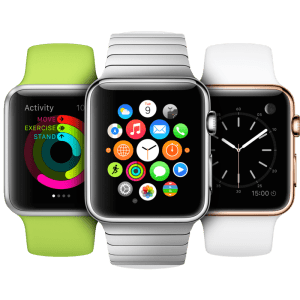
Apple Watch

With the Sept 2014 announcement for Apple Watch, Apple joined the crowded league of Google, Samsung, Motorola, Fitbit, Pebble, etc. jostling for the next wave of wearable computing. When it became available for pre-order in April 2015, after some research, I decided to postpone the purchase until the next generation Apple Watch.

When Apple announced the watchOS 2 in the June WWDC, I ordered the Apple Watch as soon as I finished watching the opening day keynote video! I was excited about what’s coming in Apple watchOS 2 and I wanted to live through that evolution.

I finally got my Apple Watch Sport a month ago. I’m not going to bore you with unboxing photos and videos (you can find that here, here and here). Instead, here are my impressions based on my 4 weeks of use:

Useful – but not compelling

  • Activity Tracking: With those 3 concentric activity circles on Apple Watch that visualize your Move/Exercise/Stand times, what we’ve always suspected is now confirmed – our lives are very very sedentary. The periodic haptic feedback on the wrist is a nice subtle nudge to get off the butt!
  • Notifications & Messages: I setup my watch to receive notifications from a select few apps (e.g. Messages, Calendar, Whatsapp, etc.) and blocked notifications from most other apps. It’s convenient to quickly view messages & select notifications on the wrist without having to pull out the phone.
  • Phone Calls: At the risk of looking like a “beam-me-up-Scotty” Star Trek geek, talking into your watch for a quick 10 second call (e.g. “honey, please pick up the kids”) on the phone is useful on occasion.
  • Glances: As the name suggests, Glances on Apple Watch provides a “one screen construct” for apps to surface their functionality. Most third party apps that I used make an uninspired use of the Glances construct. However, one app that shines at the use of Glances is the Zillow app. The other day I was hanging out on the Carmel beach with my out of state friends. As we were driving back in the car, this friend was curious about the property prices around the Ocean Ave in Carmel. While driving, I just swiped up on my watch and the Zillow’s Glances interface showed the nearest property value – neat! When implemented correctly, Glances experience can be sublime.
  • Siri: Siri on the wrist is infinitely more convenient than using Siri on iPhone to satiate those moments of curiosities!

Not so great

  • Battery Issues: The 24 hour battery life on the Apple Watch is inadequate – nuff has been written about that in tech rags. It doesn’t end there. To support the up-to-date display of watch-face complications (calendar, weather, stocks, etc.), turns out that the watch is constantly chit-chatting with its sibling iPhone – and that drains the iPhone battery. Yuck!
  • Geeky Look: Is it the thickness, the rubber strap, rectangular shape or the profile of the watch (looks like a mini iPhone on the wrist)? Maybe all of the above. Regardless of how salivating it looks on Apple website, Apple Watch on most wrists looks geeky!
  • Expensive Straps: I understand the strategy of premium pricing, accessory margins, etc. However, the $49 rubber strap (errr Fluoroelastomer) is too expensive even for Apple provenance – the COGS (cost of goods sold) on this band is $2.05 according to research firm IHS! Don’t even get me started on the $249 modern buckle leather band & $449 link bracelet. I ended up buying a $20 leather band from eBay! When Apple launched the iPhone1 in June 2007, they dropped the price by $200 after 66 days of the launch. Will history repeat itself? @AngelaAhrendts, are you listening?

Future – Wearable Apps, NOT Mobile Apps

Given my lukewarm experience, it’s tempting to write off the Apple Watch. Tepid sales of 3+ million units for Apple Watch to-date confirms my own experience – most people find it to be a curious (and an expensive) technology – not very compelling!

BUT, I’m still excited about the Apple Watch prospects (and the smart watch industry in general). Why?

Most Apple Watch experiences today (especially the third party apps) are built as an after-thought extension of their iPhone apps. Perhaps that’s a result of the architecture of the WatchKit SDK today – the watch app extension code runs on the phone while the display is handled on watch. I call these mobile app extensions for the watch.

However, the watchOS 2 (coming in Fall 2015) changes the paradigm. Apple watchOS 2 allows apps that are completely native to the watch – apps that execute natively on the watch and can access the motion sensors, audio capabilities, health sensors, etc. on the watch – i.e. wearable apps. This new breed of wearable apps are purpose built for the watch – and not poor extensions of today’s mobile apps. While mobile apps and wearable apps share similarities, wearable apps are distinctly different and enable experiences that are not possible with today’s mobile apps:

  • Purpose Built:  The best apps for Apple Watch are built for the wrist AND they naturally lend themselves to off-the-wrist consumption – not just extensions of the phone app. I’m glad that Facebook & Snapchat decided to defer their watch apps until they have something more compelling!
  • Immediacy: Imagine turning your wrist to a custom clock face/complications that shows you the exact information you want – e.g. the yardage of the next hole on the golf course. With mobile apps this will require pulling out the phone from your pocket, unlock the screen, launch an app etc.
  • Sensor Driven: Unlike the iPhone that alternates its stay on the dresser, in the pocket, car’s cup holder and the desk, the Apple Watch remains strapped to your wrist for the better part of the day. Imagine a watch app that analyzes your hand/body motion movement and identifies early signs of carpal tunnel syndrome or other health issues. Imagine apps that take advantage of heart rate data.
  • Discreet: Imagine you were carjacked. You could discreetly triple click the button/crown that notifies the law enforcement agencies with you location. It could even activate and relay the microphone audio stream off the watch.

Just as the mobile apps today enable a distinctly different functionality compared to the desktop & web-based applications of yesteryears, I expect the new class of wearable apps (end of the year?) to offer user experiences that are above and beyond today’s mobile apps. This is exciting!


Verdict:

Apple Watch + watchOS 1.1 today = platform for Mobile Apps (& Extensions)

Apple Watch + watchOS 2.0 tomorrow = platform for Wearable Apps

This is a classic case of “Judge me not for what I’ve done, but what I’ll do!

Sharpening Axes & Chopping Trees – User Research & Building Products

Give me six hours to chop down a tree and I will spend the first four sharpening the axe. 

– Abraham Lincoln

Why do certain companies like Apple, Netflix, Google, etc. offer compelling product experiences (i.e. software features & functionality, user experience, etc.) while other companies just put out mediocrity? Most technology companies employ similar set of product teams comprised of engineers, QA, product managers, visual designers, etc. So what gives?

Everything else being equal, it’s the investments these companies are willing to make in User Research (not UX, graphic artists or Visual Design, but pure user research)!

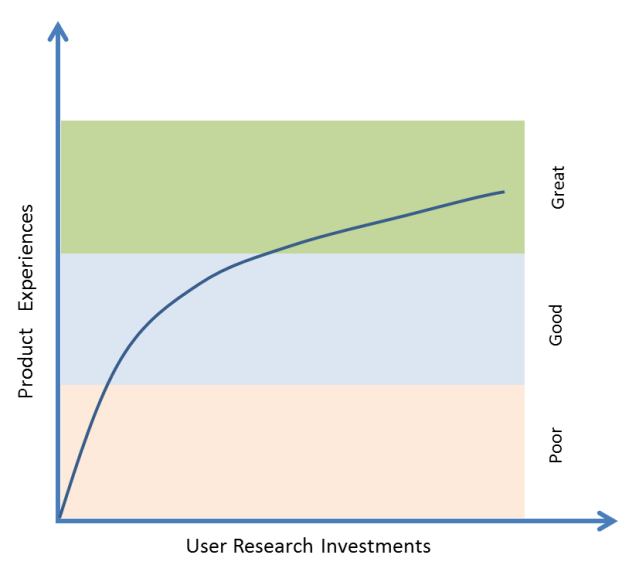
Here is a figure that illustrates my observations and experience.

UR Investments

Engineers, product managers, product marketing and visual designers can only do so much with brainstorming, competitive research, market research, reading tea leaves in analytics data, etc. to drive good product experiences. To really elevate good product experiences to great product experiences, what’s needed is a healthy amount of user research.

Examples?

  • Activity & Fitness tracking in Apple Watch: It’s a common notion to attribute Apple’s success to their stellar marketing. While it’s true that Apple’s marketing is second to none, it’s the product experiences that are central to Apple’s success – marketing just provides lubrication & acceleration for that success. To come up with compelling product experiences, Apple spends massive amounts of time and effort researching users, lifestyles, use case scenarios, etc. and that insight is used to drive the product’s functionalities. To drive the fitness and activity tracking functionality in Apple Watch, Apple invested in a 23,000 sq ft fitness lab and spent 2 years collecting 18,000 hours worth of workout data based on 10,000 sessions. The functionality that you see in Apple Watch today is based on those insights. Regardless of whether Apple Watch succeeds or bombs, its impressive to see Apple put in that kind of effort for just the activity & fitness tracking aspect of their product. More details and a video on this…
  • Moto X Active Display: If you are a Android handset maker, how do you differentiate yourself from other Android handsets that are all powered by Google’s Android? Motorola’s Moto X has a clever feature called Active Display that allows you to see the clock and notifications without turning ON the phone. This power saving Active Display capability came out of user research & observation that people turn ON their phones 40-50 times a day (and drain battery) just to see the clock and notifications. See Punit Soni (ex-VP at Motorola) talk about the user research that led to this innovation…
  • Netflix new redesign: We are all guilty of occasional indulgence in binge watching Breaking Bad, Game of Thrones, House of Cards, etc. In June 2015 we can do more of that when Netflix launches its major redesign in 4 years. This redesign was based on insights obtained by a dozen researchers conducting 1500 interviews in people’s homes to understand how they use Netflix. Netflix also sent out 15 million surveys to get an understanding on what it takes to get people to watch shows. All this user research takes a large amount of effort to eke out further improvements in an area where Netflix already has a monopoly. More details on this…

What happens to products developed without User Research? Products developed without the insights & context of User Research tend to become engineering and feature driven rather than user need driven!

That brings us to the point about axes and trees…

Before chopping a tree, spending hours to sharpen an axe is all about preparation. Similarly, to prepare for & to create compelling product experiences, companies (especially software companies) need to invest more in user research and use that insight to drive the functionalities & user experiences that make (or break) products!

So, how well does your company invest in User Research?

Tools & Technologies for Building Mobile Products

We shape our tools and afterwords our tools shape us!

– Marshall McLuhan

Mobile Technologies

I have been building Mobile Products since Mar 6 2008 – the day the iOS SDK was first launched. As a Product Guy, I work with teams of engineers, QA, designers & marketers. Here are some of the tools and cloud platforms that we have used in the past to build world class mobile products.

A/B Testing: There’s a notorious Silicon Valley story about Marissa Mayer (CEO of Yahoo, ex-googler) that once tested 41 shades of blue on the google.com homepage just to test which shade of blue consumers prefer! A/B Testing refers to the practice of testing different variations of a product design and measuring results to see which variant performs best. Companies like Google, Yahoo & Facebook are well known for rigorous A/B Testing to determine what works best.

  • Artisan: Artisan has a great A/B Testing platform that lets you A/B test without doing any coding for those different variants and without having to force the end users to download the newer versions of the app. Once the Artisan SDK is integrated into your app, you can use the Artisan dashboard to create test segments and deploy different A/B tests (e.g. different strings, button colors/sizes/locations, different images, etc.) without having the touch the app code. Getting A/B tests done without having engineers code them into the product saves precious engineering cycles. Similar Products: Optimizely

Analytics:

  • Google Analytics: Google Analytics is a well-known analytics platform used by thousands of websites to track user behavior. In the recent years, Google extended that platform to offer similar capabilities to the mobile apps. While the Google Analytics for mobile is a great platform with lots of bells and whistles, be ready for a learning curve. Sometimes to get mundane data and insights, it takes non-trivial effort.
  • Flurry: Flurry was one of the first analytics platform on the mobile scene until it was acquired by Yahoo in the recent past. Flurry offers a pretty good analytics platform that is easy to use. What it lacks in bells in whistles it makes up by its ease of use – at least when compared to Google Analytics. Flurry also has an interesting concept of personas that lets you see what kinds of people are using your apps.

App Distribution: 

  • HockeyApp: When you have a team of product managers, QA, developers, marketing, designers, etc. they all need to test & use the product under development. The HockeyApp platform for iOS & Android (recently acquired by Microsoft) makes it easy for teams to get the access the latest builds of the product to test and use. Saves engineers the headache of manually installing builds on everybody’s devices.

Crash Reporting:

  • Crashlytics: When developing products, crashes are a reality. Crashlytics has a pretty good platform that captures the crash analytics data so that developers can analyze and fix crashes. My engineers setup integration between Crashlytics and Slack such that they get an automated message posted on their Slack channel whenever there was a Level 3 (and higher) crash. Sweet!

Customer Support:

  • HelpShift: If you have a high touch mobile product and want to offer a solid customer support experience from within the app, checkout HelpShift. HelpShift allows mobile users to access the FAQs from within the app and get in touch with the customer support teams from within the app.

Deep Linking:

  • Branch.io: A neat platform to enable deep linking within your app.

Reporting: For a small monthly fee, reporting platforms automatically fetch your Google Play & AppStore app download stats and show that data in pretty graphs that you can slice and dice – very useful for Product Managers, Marketers and execs. They even generate daily/weekly/monthly reports that are automatically emailed to teams.

  • AppFigures: AppFigures has a good reporting platform that pretty much does all what you need.
  • AppAnnie & Distimo: Both these companies recently went through a merger. In addition to reporting, they also offer high level aggregated reports & insights organized by leaderboards, platforms, geographies, categories etc. Very useful to understand broad trends in the mobile ecosystem.

Marketing Automation:

  • AppBoy: Allows you to run push notification, email & in-app messaging campaigns to your mobile app users to drive app engagement. Once their SDK is wired into your app, you also get other capabilities such as analytics, install attribution, etc.

Performance Monitoring:

  • Pulse.io: To monitor and track hard to solve performance problems such as spinners, loading delays, network lags, etc. you will find this tool to be quite useful. Google recently acquired this company. Similar Products: Newrelic

Prototyping & UX:

  • Invision: Once you have the UX mockups, use Invision for prototyping the app’s flow – get a real feel for the app using a dynamic prototype that you can touch & feel instead of evaluating with static wireframes.

Miscellaneous:

  • PLJukeBox: When using the Music app on iOS devices, if your turned the device to landscape mode, you can see the coverflow (i.e. the neat album art row that you can flip through). If you want to offer a similar experience in your app without writing all that custom code, use the PLJukeBox SDK to make it happen.

I’d be curious to know the tools and platforms that other companies use for mobile product development! Post your comments below…