Driving Big Impact with Little Details

Little things make big things happen!

– John Wooden

Attention to Detail

Ever wondered what sets apart a 3-star Hilton from a 4-star Hyatt? A 4-star Hyatt from a 5-star Ritz Carlton? End of the day, they are all hotels with similar amenities – beds, bathroom, linen, TV, writing desk, swimming pool, front desk etc. So what gives?

Attention to Little Details!

Among other things, the biggest differences within different levels of hotels are the little details that translate to a more refined customer experience. As you go up the star chain, the attention to detail gets better – the guy behind the desk is better dressed and more helpful, the bed sheet thread count goes up, pillow menu – multiple pillows of varying softness, the room décor & accoutrements are more refined, swimming pool is better maintained, nicer landscaping, parking lots are better paved & lighted, etc.

However, when it comes to the technology world, for a variety of reasons, there is a lot of focus on ROI driven “big bang” features and functionality while refinements and attention to smaller details often take a back seat.

When using products (and driving my teams that build technology products), I tend to pay a lot of attention to little details. Here are a few that I love:

  • Palm Treo (RIP): The Palm platform had its own share of rabid followers until iOS/Android ate its lunch (and dinner). On the Palm Treo when you received a call, there was a little button on the lock screen that let you send a text message “Call you back in 10 mins” with one click of the button. That’s a clever little detail that I always wanted on the iPhone – Apple added this last year in iOS 8.
  • Microsoft Outlook’s Insert Screenshot: A lot of people in corporate world would rather give up their first born than give up Microsoft Outlook on Windows (I am probably in that camp). When writing emails, you often need to add a screenshot to illustrate your point. Outlook’s email compose window has the “Insert > Screenshot” menu to quickly add a screenshot. This is one of those little gems that saves the tedium of “capture screenshot > save image to desktop > attach image to email > delete image file on desktop”.
  • Apple Magic Mouse 2 “Sound”: One can’t talk about attention to detail without an obligatory mention of Apple! Recently Apple released the Magic Mouse 2. With all the changes they made, apparently the mouse didn’t “sound right” when it was moved around on the desk. The engineers had to continuously tweak the bottom polycarbonate runner geometry until the mouse “sounded right”. Read more here…
  • BMW 328i: Cars have 5 to 6 buttons on the dashboard to program your favorite radio station. BMW takes those 6 buttons to the next level with 2 refinements: (1) Those 6 buttons are touch-sensitive – if you lightly touch (not press) any of those buttons, the dashboard display shows the radio station (or action) assigned to that button. (2) You can assign different actions to those 6 buttons – not just radio stations. I programmed the 6th button in my wife’s car to the navigation system’s “Go Home” functionality. When driving in unfamiliar neighborhoods, to head home, all my wife has to do is press the button 6 and the navigation system fires up to head home. This really saves her the distraction of futzing around the multi-level menus when driving. Clever!
  • Google Express: Yesterday I ordered a few items on Google Shopping Express. When they were delivered in the evening around 7:45pm, there was a problem with one item in the batch – the lid for a liquid soap bottle was broken. At 8pm somebody from Google Express called to discuss the issue. Usually delivery services expect the customer to contact the company when there is a problem. In this case, Google Express proactively called me to discuss the issue. To make that happen, Google had to setup a process where the delivery driver notifies the back office about a problem & the backoffice calls the customer immediately (at 8pm) – providing that level of service requires a non-trivial investment of time and resources. Kudos to Google!

So, organizationally (not at an individual level), how to drive attention to detail?

4 things come to my mind:

  1. Resources: You have the ask the tough question – do my teams have the people and resources to deliver attention to detail? Quite often, teams are spread thin – too few people doing too many things – structurally that does not lend itself attention to detail. In order to deliver attention to detail, you need to make sure that people aren’t spread too thin.
  2. Hiring Right: Hire the people with the right background, culture and mindset. Hiring a chef from Taco Bell for a job at Ritz Carlton doesn’t work!
  3. Balanced Roadmaps: As a part of product roadmaps, mandate your team to include refinements that improve user experience with little details. More on that here…
  4. Set the Bar: An expectation & bar needs to be set with regards to attention to detail – AND hold people accountable to that bar. For example – if your product/service doesn’t meet the expected bar, delay the launch. That puts the pressure on the teams to keep working until the bar is met.

Summary

Whether its products or services, B2B or B2C, in addition to ROI driven activities, features and capabilities, teams need to invest time & resources to pay close attention to detail. That is how products/services build a strong fan base that resist abandoning your product/service when a competitive product/service with a cheaper price comes along.

No wonder successful companies like Apple, Lexus, Ritz Carlton, Microsoft, etc. consider “attention to detail” a big part of their strategy to deliver great products/services!
Sharpening Axes & Chopping Trees – User Research & Building Products

Give me six hours to chop down a tree and I will spend the first four sharpening the axe. 

– Abraham Lincoln

Why do certain companies like Apple, Netflix, Google, etc. offer compelling product experiences (i.e. software features & functionality, user experience, etc.) while other companies just put out mediocrity? Most technology companies employ similar set of product teams comprised of engineers, QA, product managers, visual designers, etc. So what gives?

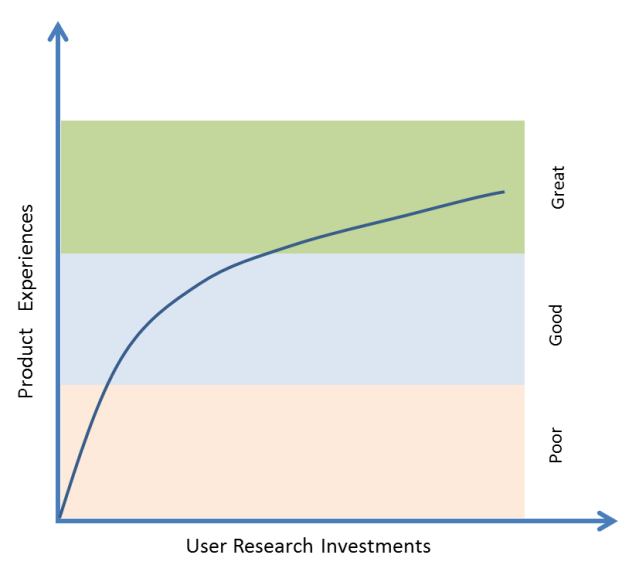
Everything else being equal, it’s the investments these companies are willing to make in User Research (not UX, graphic artists or Visual Design, but pure user research)!

Here is a figure that illustrates my observations and experience.

UR Investments

Engineers, product managers, product marketing and visual designers can only do so much with brainstorming, competitive research, market research, reading tea leaves in analytics data, etc. to drive good product experiences. To really elevate good product experiences to great product experiences, what’s needed is a healthy amount of user research.

Examples?

  • Activity & Fitness tracking in Apple Watch: It’s a common notion to attribute Apple’s success to their stellar marketing. While it’s true that Apple’s marketing is second to none, it’s the product experiences that are central to Apple’s success – marketing just provides lubrication & acceleration for that success. To come up with compelling product experiences, Apple spends massive amounts of time and effort researching users, lifestyles, use case scenarios, etc. and that insight is used to drive the product’s functionalities. To drive the fitness and activity tracking functionality in Apple Watch, Apple invested in a 23,000 sq ft fitness lab and spent 2 years collecting 18,000 hours worth of workout data based on 10,000 sessions. The functionality that you see in Apple Watch today is based on those insights. Regardless of whether Apple Watch succeeds or bombs, its impressive to see Apple put in that kind of effort for just the activity & fitness tracking aspect of their product. More details and a video on this…
  • Moto X Active Display: If you are a Android handset maker, how do you differentiate yourself from other Android handsets that are all powered by Google’s Android? Motorola’s Moto X has a clever feature called Active Display that allows you to see the clock and notifications without turning ON the phone. This power saving Active Display capability came out of user research & observation that people turn ON their phones 40-50 times a day (and drain battery) just to see the clock and notifications. See Punit Soni (ex-VP at Motorola) talk about the user research that led to this innovation…
  • Netflix new redesign: We are all guilty of occasional indulgence in binge watching Breaking Bad, Game of Thrones, House of Cards, etc. In June 2015 we can do more of that when Netflix launches its major redesign in 4 years. This redesign was based on insights obtained by a dozen researchers conducting 1500 interviews in people’s homes to understand how they use Netflix. Netflix also sent out 15 million surveys to get an understanding on what it takes to get people to watch shows. All this user research takes a large amount of effort to eke out further improvements in an area where Netflix already has a monopoly. More details on this…

What happens to products developed without User Research? Products developed without the insights & context of User Research tend to become engineering and feature driven rather than user need driven!

That brings us to the point about axes and trees…

Before chopping a tree, spending hours to sharpen an axe is all about preparation. Similarly, to prepare for & to create compelling product experiences, companies (especially software companies) need to invest more in user research and use that insight to drive the functionalities & user experiences that make (or break) products!

So, how well does your company invest in User Research?

Tools & Technologies for Building Mobile Products

We shape our tools and afterwords our tools shape us!

– Marshall McLuhan

Mobile Technologies

I have been building Mobile Products since Mar 6 2008 – the day the iOS SDK was first launched. As a Product Guy, I work with teams of engineers, QA, designers & marketers. Here are some of the tools and cloud platforms that we have used in the past to build world class mobile products.

A/B Testing: There’s a notorious Silicon Valley story about Marissa Mayer (CEO of Yahoo, ex-googler) that once tested 41 shades of blue on the google.com homepage just to test which shade of blue consumers prefer! A/B Testing refers to the practice of testing different variations of a product design and measuring results to see which variant performs best. Companies like Google, Yahoo & Facebook are well known for rigorous A/B Testing to determine what works best.

  • Artisan: Artisan has a great A/B Testing platform that lets you A/B test without doing any coding for those different variants and without having to force the end users to download the newer versions of the app. Once the Artisan SDK is integrated into your app, you can use the Artisan dashboard to create test segments and deploy different A/B tests (e.g. different strings, button colors/sizes/locations, different images, etc.) without having the touch the app code. Getting A/B tests done without having engineers code them into the product saves precious engineering cycles. Similar Products: Optimizely

Analytics:

  • Google Analytics: Google Analytics is a well-known analytics platform used by thousands of websites to track user behavior. In the recent years, Google extended that platform to offer similar capabilities to the mobile apps. While the Google Analytics for mobile is a great platform with lots of bells and whistles, be ready for a learning curve. Sometimes to get mundane data and insights, it takes non-trivial effort.
  • Flurry: Flurry was one of the first analytics platform on the mobile scene until it was acquired by Yahoo in the recent past. Flurry offers a pretty good analytics platform that is easy to use. What it lacks in bells in whistles it makes up by its ease of use – at least when compared to Google Analytics. Flurry also has an interesting concept of personas that lets you see what kinds of people are using your apps.

App Distribution: 

  • HockeyApp: When you have a team of product managers, QA, developers, marketing, designers, etc. they all need to test & use the product under development. The HockeyApp platform for iOS & Android (recently acquired by Microsoft) makes it easy for teams to get the access the latest builds of the product to test and use. Saves engineers the headache of manually installing builds on everybody’s devices.

Crash Reporting:

  • Crashlytics: When developing products, crashes are a reality. Crashlytics has a pretty good platform that captures the crash analytics data so that developers can analyze and fix crashes. My engineers setup integration between Crashlytics and Slack such that they get an automated message posted on their Slack channel whenever there was a Level 3 (and higher) crash. Sweet!

Customer Support:

  • HelpShift: If you have a high touch mobile product and want to offer a solid customer support experience from within the app, checkout HelpShift. HelpShift allows mobile users to access the FAQs from within the app and get in touch with the customer support teams from within the app.

Deep Linking:

  • Branch.io: A neat platform to enable deep linking within your app.

Reporting: For a small monthly fee, reporting platforms automatically fetch your Google Play & AppStore app download stats and show that data in pretty graphs that you can slice and dice – very useful for Product Managers, Marketers and execs. They even generate daily/weekly/monthly reports that are automatically emailed to teams.

  • AppFigures: AppFigures has a good reporting platform that pretty much does all what you need.
  • AppAnnie & Distimo: Both these companies recently went through a merger. In addition to reporting, they also offer high level aggregated reports & insights organized by leaderboards, platforms, geographies, categories etc. Very useful to understand broad trends in the mobile ecosystem.

Marketing Automation:

  • AppBoy: Allows you to run push notification, email & in-app messaging campaigns to your mobile app users to drive app engagement. Once their SDK is wired into your app, you also get other capabilities such as analytics, install attribution, etc.

Performance Monitoring:

  • Pulse.io: To monitor and track hard to solve performance problems such as spinners, loading delays, network lags, etc. you will find this tool to be quite useful. Google recently acquired this company. Similar Products: Newrelic

Prototyping & UX:

  • Invision: Once you have the UX mockups, use Invision for prototyping the app’s flow – get a real feel for the app using a dynamic prototype that you can touch & feel instead of evaluating with static wireframes.

Miscellaneous:

  • PLJukeBox: When using the Music app on iOS devices, if your turned the device to landscape mode, you can see the coverflow (i.e. the neat album art row that you can flip through). If you want to offer a similar experience in your app without writing all that custom code, use the PLJukeBox SDK to make it happen.

I’d be curious to know the tools and platforms that other companies use for mobile product development! Post your comments below…